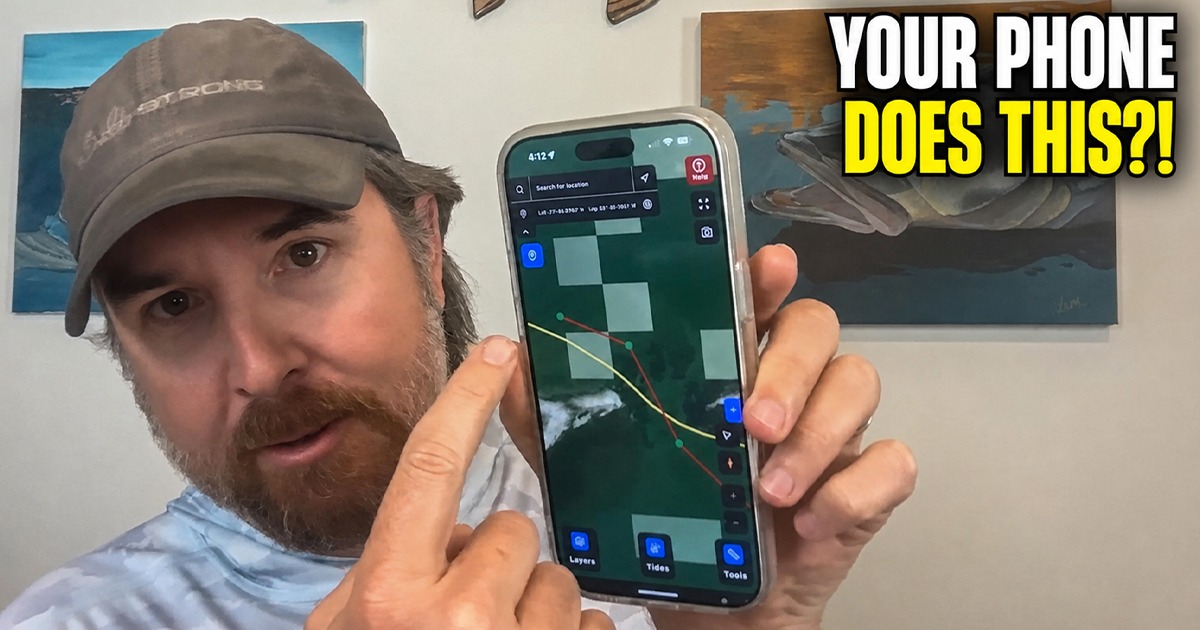
Your phone already takes pictures, checks the tides, and probably distracts you more than it should.
But it can also record your fishing trips, organize your catches, save private spots, and help reveal the conditions that produce your best days on the water.

It is basically a fishing data cruncher in your back pocket.
Luke has been digging into these features and finding some amazing use cases.
Boat GPS on steroids?
Whatever we call it, this thing does some seriously cool stuff.
Here is how it works.

Featured Software:
What Are Routes in Smart Fishing Spots?
Routes help you map out a fishing trip before you hit the water.
Luke likes creating them on his computer because the larger screen makes it easy to study an area and mark the water he wants to explore.
As soon as he saves a route, it appears on his phone.
You can research an area from home, mark the zones you want to fish, and have that plan in your pocket when the trip begins.
What Are Fishing Tracks?
Routes show what you planned. Tracks show what you actually did.
Turn tracking on at the start of a trip, and Smart Fishing Spots records your movement throughout the day. Afterward, you can review the water you covered, compare your drifts, and see exactly where the action happened.
Luke recently used this while drift fishing for trout.
His track showed that most of the strikes came along the deeper outside edge of a grass flat, not on top of the shallow section. When he returned to the area, he could focus on the zone that had already produced fish.
That is much better than getting home and saying, “I think we caught them somewhere over there.”
What Information Does the Catch Log Save?
Every catch can become a private data point inside Smart Fishing Spots.
Depending on the information available with your photo, the app can organize catches using details such as:
- Date and time
- Tide cycle
- Wind direction and speed
- Temperature
- Barometric pressure
- Moon phase
- Lure and trip notes
You can upload catches directly to the tool or add photos through an Insider Community fishing report.
Either way, your personal catch pins stay private unless you deliberately share them.
Can Smart Fishing Spots Organize Older Fishing Photos?
Yes, and this is one of the coolest features.
If your old fishing photos contain time and location information, the app can place those catches on your private map. It can also retrieve the historical tides and weather from when each fish was caught.
Those forgotten photos sitting in your camera roll can suddenly become useful fishing information.
Instead of only remembering that you crushed the trout “a few summers ago,” you can see the month, tide, wind, conditions, and location associated with that trip.
How Does Your Catch History Help You Find Patterns?
Once you build a catch history, you can filter it by month, tide cycle, wind, temperature, pressure, moon phase, and other conditions.
That helps answer questions like:
- Where do I consistently catch redfish in August?
- Which areas produce during an incoming tide?
- What wind direction has been best for trout?
- Where have I caught fish under conditions similar to today?
Most anglers save spots.
This lets you save the story behind each spot.
A waypoint tells you where something happened. Your catch history helps explain when and why it may have happened.
Are Your Fishing Spots Private?
Yes.
Your routes, tracks, waypoints, and catch pins are private by default. Other members cannot see them unless you choose to share something.
Private member catches are also NOT used to generate the recommended Smart Spots inside the app.
Smart Spots are built separately using areas evaluated by fishing professionals. The system considers factors such as season, tide cycle, wind direction, and current conditions to highlight promising areas.
You get the benefit of Smart Spots while keeping your personal fishing history private.
Can You Access Your Fishing Data From Different Devices?
Yes. Your information is connected to your profile instead of being trapped on one piece of equipment.
You can study an area on your computer, save a route or waypoint, and access it from your phone. Your tracks and catches stay with you whether you are fishing from your boat, a friend’s boat, a kayak, a paddleboard, or from shore.
For Luke, that was a huge benefit. Instead of installing another expensive unit on his paddleboard, he can use the same fishing information he has already saved in Smart Fishing Spots.
Is Smart Fishing Spots Only for Beginners?
Not even close.
New anglers can use it to shorten the learning curve, but the trip planning and catch analysis tools are valuable for experienced fishermen, too.
Professional captains and highly accomplished anglers are already using the app to organize information, study patterns, and preserve what they learn from every trip.
It is not about whether you are a beginner or a pro.
It is about using better information to catch more fish consistently.
How Do You Start Using Routes and Tracks?
Try this on your next trip:
- Study the area inside Smart Fishing Spots.
- Create a route showing the water you want to explore.
- Add private waypoints to interesting areas.
- Turn on tracking when the trip begins.
- Save your catches.
- Review everything afterward.
Every trip adds more information to your private fishing history and makes the app even more valuable.
If you are already an Insider member, open Smart Fishing Spots and start playing around with routes and tracks.
If you are not a member yet, click here to learn more.
Final Thoughts
The best fishing tools are the ones that help you learn from every trip.
Smart Fishing Spots does more than save a few pins on a map. It helps you record where you fished, connect catches with real conditions, and recognize patterns you might otherwise miss.
The more you use routes, tracks, waypoints, and the catch log, the more valuable your personal fishing history becomes.
What Smart Fishing Spots feature should we break down next? Let us know in the comments!


So, why does the app now have a red banner warning reading “Not for navigation purpose”?
Very worthwhile presentation to watch a few times. Difficult to grasp the usage is a single viewing. Because the capability of the app is so broad, it calls for additional presentations associated with fishing in different locations such as marshes, around bridges and around docks. Thank you for your explanations of how you use this capability.
Any chance that the future may hold the use of your phone microphone to dictate inputs as opposed to typing?
Maybe i missed it. Your catch gets logged with pic and weather, tide, etc. In the filter section it shows the date and number on catches on that month.
Question: how do i go back into the data and say, pic a month and see what the weather and tides and moon were for that catch?
So, in future i can pick a date and or tide and see if that area produced
Does this system work for fishing for walleye in Kansas?
Thanks guys! This is an awesome feature on the Smart Fishing Spots !
Well unfortunatly just like I commented on this article i really don’t use smart spots app anymore because I fish the same locations year after year and have for going on 24 years now but was curious to see if the app had changed and even after the app requested me to upgrade it it still DOESN’T show my catch logs from 2024 and older it STILL cuts off my fishing reports mid sentence because like I also said before because the smart spots app wasn’t around 2 years ago or was still in the very beginning stages all ones older reports from 2024 and older are not complete yes the tide phases as well as the moon phases are all there my detailed fishing reports are not complete and only a few sentences are there and to me I use my detailed reports much more then the other things the app lists because I also mention ALL these important details in my very detailed report like I do with ALL my fishing reports I post in the community so inbreality I personally donot see how the app has really changed in the last few months when I had this trouble with it and reported it before just saying just goes to show you how much the computerized world we now live in is very flawed but thats why I rely on my old school thinking and not a computor or phone to tell me what’s right or wrong and yes it may not be even close to being as fast but its definatly more reliable and that works for me just fine enough said🤔
The drawback is being in an area of limited cell service. Where I fish the cell service is basically non existent. Ditto with using Smart Spots on the water.
My cardiologist said if I need 1000 waypoints ,that my life is too complicated lol
This is a great tool and it just gets better! Lots of thought and planning went into all this, thank you.